
There are functionalities you eventually always need. Correctly handling selections in WPF is a good example. Searching the internet for solutions, however, reveals that most suggestions lead to violations of the MVVM pattern or unwanted side effects. This article aims to present suitable methods for working with selections in WPF.
Selection within a ListBox
Handling selection within a ListBox is actually straightforward. The entries of a ListBox are bound to an ObservableCollection of the ViewModel via the ItemsSource property. The DisplayMemberPath determines which property is displayed in each row — in this example, Name. Additionally, the current selection of the ListBox is bound to the SelectedItem property. The resulting ViewModel class looks like this:
public class SingleViewModel { ObservableCollection<ItemViewModel> _items; public ObservableCollection<ItemViewModel> Items { get { return _items ?? (_items = CollectionCreator.CreateItems(200)); } } public ItemViewModel SelectedItem { get; set; } }
Each entry in the ObservableCollection is itself a ViewModel, consisting only of the Name property:
public class ItemViewModel { public ItemViewModel(string name) { Name = name; } public string Name { get; private set; } }
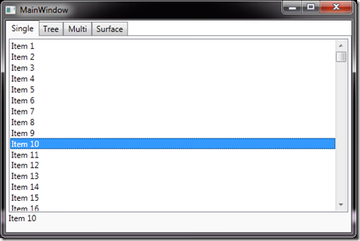
The View displays the currently selected ListBox entry as text for demonstration purposes.
<DockPanel DataContext="{StaticResource ViewModel}"> <TextBlock DockPanel.Dock="Bottom" Text="{Binding SelectedItem.Name}" Height="25"/> <ListBox ItemsSource="{Binding Items}" DisplayMemberPath="Name" SelectedItem="{Binding SelectedItem}" /> </DockPanel>
After assigning a SingleViewModel instance to the View's data context, we can see that accessing the current selection already works this way.
Selection within a TreeView
The previous example used a simple list. But what if our data is structured in a two-level hierarchy without grouping? For this case, we extend our ItemViewModel with an enclosing NodeViewModel:
public class NodeViewModel { public NodeViewModel(string name) { Name = name; } public string Name { get; internal set; } public ObservableCollection<ItemViewModel> Leafs { get; set; } }
We extend the TreeView's ViewModel with a second selection option:
public class TreeViewModel { ObservableCollection<NodeViewModel> _nodes; public ObservableCollection<NodeViewModel> Nodes { get { return _nodes ?? (_nodes = CollectionCreator.CreateNodes(100, 5)); } } public NodeViewModel SelectedNode { get; set; } public ItemViewModel SelectedLeaf { get; set; } object _selectedItem; public object SelectedItem { get { return _selectedItem; } set { SelectedLeaf = value as ItemViewModel; SelectedNode = value as NodeViewModel; } } }
When attempting to set the selected entry simply via binding, we are disappointed: the SelectedItem property is read-only and cannot be changed. Searching the internet for this issue reveals a suggestion to map the IsSelected property of each TreeViewItem to a corresponding property in its associated NodeViewModel. However, this is inadvisable for several reasons:
- If a command depends on this selection and its CanExecute should respond to a SelectionChangedEvent, all items would need to notify the ViewModel of their status changes.
- Conceptually, the selection property should not belong to the item. This can prevent filling two lists with identical item ViewModels while keeping selections separate — which can be useful in, for example, an implementation of the List-Builder pattern.
- As can be tested with multi-selection below, you either destroy the virtualization of the list — leading to significant performance losses — or you get unreliable results. For example, when executing SelectAll, only the first 20 items are reported as selected even though the list contains 100 items. Only after scrolling down are all items reported as selected. The reason is that the remaining 80 items have not yet been instantiated due to virtualization, so the bindings to the IsSelected property haven't been established yet.
This approach can be chosen if you are aware of the consequences. However, the alternative is not that complicated: implement a Behavior that handles synchronization of the TreeViewItem selection state and mediates between the TreeView and its ViewModel, instead of relying on direct binding.
The only disadvantage is an additional dependency on the System.Windows.Interactivity.dll assembly.
In the XAML code itself, this approach only requires 3 additional lines:
<DockPanel DataContext="{StaticResource ViewModel}"> <StackPanel DockPanel.Dock="Bottom" Orientation="Horizontal" Height="25"> <TextBlock Text="{Binding SelectedNode.Name}" /> <TextBlock Text="{Binding SelectedLeaf.Name}" /> </StackPanel> <TreeView ItemsSource="{Binding Nodes}"> <TreeView.ItemTemplate> <HierarchicalDataTemplate ItemsSource="{Binding Leafs}"> <TextBlock Text="{Binding Name}"/> </HierarchicalDataTemplate> </TreeView.ItemTemplate> <i:Interaction.Behaviors> <Behaviors:SelectedItemBehavior SelectedItem="{Binding SelectedItem, Mode=TwoWay}"/> </i:Interaction.Behaviors> </TreeView> </DockPanel>
The Behavior itself simply registers the SelectedItem DependencyProperty and subscribes to changes in the selected item of the TreeView. The corresponding event handler keeps the selected item synchronized between the TreeView and the TreeViewModel:
public class SelectedItemBehavior : Behavior<TreeView> { public static readonly DependencyProperty SelectedItemProperty = DependencyProperty.Register("SelectedItem" , typeof(object) , typeof(SelectedItemBehavior) , new FrameworkPropertyMetadata(null, FrameworkPropertyMetadataOptions.BindsTwoWayByDefault, OnSelectedItemChanged)); static void OnSelectedItemChanged(DependencyObject d, DependencyPropertyChangedEventArgs e) { var item = e.NewValue as TreeViewItem; if (item != null) item.SetValue(TreeViewItem.IsSelectedProperty, true); } public object SelectedItem { get { return (object)GetValue(SelectedItemProperty); } set { SetValue(SelectedItemProperty, value); } } protected override void OnAttached() { base.OnAttached(); AssociatedObject.SelectedItemChanged += OnTreeViewSelectedItemChanged; } protected override void OnDetaching() { base.OnDetaching(); AssociatedObject.SelectedItemChanged -= OnTreeViewSelectedItemChanged; } void OnTreeViewSelectedItemChanged(object sender, RoutedPropertyChangedEventArgs<object> e) { SelectedItem = e.NewValue; } }
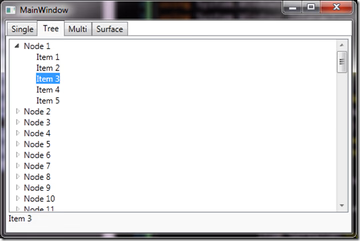
Depending on the type of selected item, we see the corresponding text in the footer:
Multi-Selection
We already noted a redundancy in holding selection information for single selections — this disadvantage is even more pronounced with multi-selection. For every check of whether a selection exists, the selection state of each individual item must be queried, for example via Items.Any(x=>x.IsSelected). Whenever a command needs to be executed on the selection, a search for items marked as selected is again required, for example via var selection = Items.Where(x=>x.IsSelected). Add to this the virtualization issues mentioned above — the selection property either becomes "unreliable," or the TreeView suffers performance degradation.
A Behavior helps here as well. It connects to the SelectionChanged event of the ListBox and synchronizes the list of selected items in the ListBox with the ViewModel. This should naturally work in both directions: when the ViewModel changes the selection, it must also be reflected in the ListBox, and vice versa.
The SynchronizeSelectedItems Behavior shown here, including the WeakEventHandler, originates from the reference implementation of Prism, MVVM RI. One might wonder why this class is not part of the WPF framework. On the other hand, we can be glad it isn't — the current version of Prism contains two bugs. Changes to the selection in the ViewModel do not affect the connected ListBox. On update, the current selection is cleared and all selection list changes are reapplied — which leads to long execution times and incorrect behavior on SelectAll. Additionally, when detaching, the event handler is bound to SelectionChanged a second time instead of being unregistered.
Below is a version of the SynchronizeSelectedItems Behavior that resolves these issues:
public class SynchronizeSelectedItems : Behavior<ListBox> { public static readonly DependencyProperty SelectionsProperty = DependencyProperty.Register( "Selections", typeof(IList), typeof(SynchronizeSelectedItems), new PropertyMetadata(null, OnSelectionsPropertyChanged)); bool _updating; WeakEventHandler<SynchronizeSelectedItems, object, NotifyCollectionChangedEventArgs> _currentWeakHandler; [SuppressMessage("Microsoft.Usage", "CA2227:CollectionPropertiesShouldBeReadOnly", Justification = "Dependency property")] public IList Selections { get { return (IList)GetValue(SelectionsProperty); } set { SetValue(SelectionsProperty, value); } } protected override void OnAttached() { base.OnAttached(); AssociatedObject.SelectionChanged += OnSelectedItemsChanged; UpdateSelectedItems(); } protected override void OnDetaching() { AssociatedObject.SelectionChanged -= OnSelectedItemsChanged; base.OnDetaching(); } }
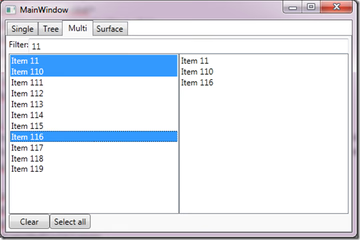
This gives us a ListView where not only selection works, but also filtering. Here is the corresponding ViewModel:
public class MultiViewModel { public MultiViewModel() { SelectAllCommand = new DelegateCommand(SelectAll); ClearSelectionCommand = new DelegateCommand(ClearSelection, CanClearSelection); SelectedItems = new ObservableCollection<ItemViewModel>(); SelectedItems.CollectionChanged += (sender, args) => ClearSelectionCommand.RaiseCanExecuteChanged(); } public DelegateCommand SelectAllCommand { get; private set; } public DelegateCommand ClearSelectionCommand { get; private set; } void SelectAll() { if (SelectedItems.Any()) { SelectedItems.Clear(); return; } foreach (var entry in Items) { SelectedItems.Add(entry); } } bool CanClearSelection() { return SelectedItems.Any(); } void ClearSelection() { SelectedItems.Clear(); } }
The corresponding View displays the selection in a separate ListBox. Note that filtered entries disappear from the selection.
<DockPanel DataContext="{StaticResource ViewModel}"> <Grid DockPanel.Dock="Top"> <Grid.ColumnDefinitions> <ColumnDefinition Width="Auto"/> <ColumnDefinition/> </Grid.ColumnDefinitions> <TextBlock Text="Filter:" /> <TextBox Grid.Column="1" Text="{Binding SearchItem, Mode=TwoWay, UpdateSourceTrigger=PropertyChanged}" /> </Grid> <ListBox ItemsSource="{Binding ItemsViewSource}" SelectionMode="Multiple"> <i:Interaction.Behaviors> <Behaviors:SynchronizeSelectedItems Selections="{Binding SelectedItems}"/> </i:Interaction.Behaviors> </ListBox> </DockPanel>
This produces the following output:
Selection in the SurfaceListBox
In the context of the Windows 8 hype, a ListBox or ListView isn't really elegant to operate via touch. Techniques familiar from iOS, such as "swipe to scroll", are not provided in these classes at all.
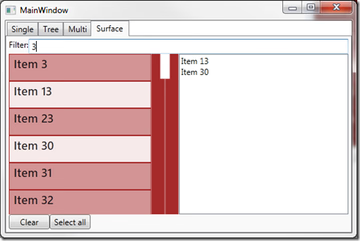
The Surface SDK from Microsoft includes a SurfaceListBox that provides exactly this functionality. And since it derives from ListBox, the Behavior described above can be used here as well. This illustrates the enormous advantage Behaviors have over simple inheritance. If we had derived from ListBox to implement selection synchronization, we could only have extended the SurfaceListBox through further inheritance — effectively duplicating code.
After declaring the corresponding Surface namespace and modifying the ListView definition from the multi-select example, we get a Windows 8-like view.
<UserControl x:Class="Selections.Views.SurfaceView" ... xmlns:i="http://schemas.microsoft.com/expression/2010/interactivity" xmlns:s="clr-namespace:Microsoft.Surface.Presentation.Controls;assembly=Microsoft.Surface.Presentation" xmlns:Behaviors="clr-namespace:Selections.Behaviors" mc:Ignorable="d" ... <s:SurfaceListBox Grid.Column="0" ItemsSource="{Binding ItemsViewSource}" Background="Brown" DisplayMemberPath="Name" HorizontalAlignment="Stretch" SelectionMode="Multiple"> <i:Interaction.Behaviors> <Behaviors:SynchronizeSelectedItems Selections="{Binding SelectedItems}"/> </i:Interaction.Behaviors> </s:SurfaceListBox>
Be aware: the Surface SDK must be installed for this. Simply referencing the assemblies is not sufficient — list box elements may not be displayed.
Conclusion
Even though mapping the selection property to individual items may seem appealing at first glance, it should not be attached to the item for more than one reason.
The Behavior-based approach shown here makes it possible to make command executability dependent on a ListBox selection, without having to check the selection on every CanExecute call. Since the current ListBox selection is provided as a property of the ViewModel, binding to that selection is also possible.
The complete example can be downloaded here.